


If you’re reading this, it’s because you’ve set up your Google Business Profile (formerly Google My Business). But if you haven’t, see our comprehensive guide to learn how to set up one for your business.
Now, I’ll show you how to optimise your Google Business Profile to rank higher in search engine result pages (SERPs) and attract more customers.
It’s not enough to just set up a business profile on Google, you must also ensure that potential customers can find it when it matters and engage with it right in the search results without having to pay for ads.
This article will show you exactly how to optimise your Google Business Profile for your salon or spa to attract more customers.
Why do you need to optimise your Google Business Profile?
If you were a potential customer looking for a hair salon near you and these two business profiles popped up, which are you more likely to choose?
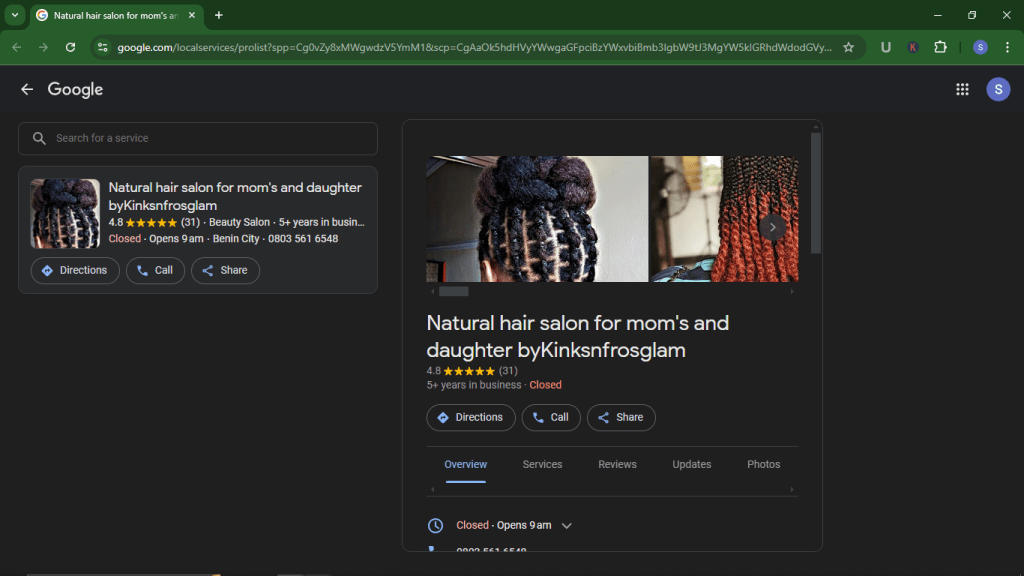
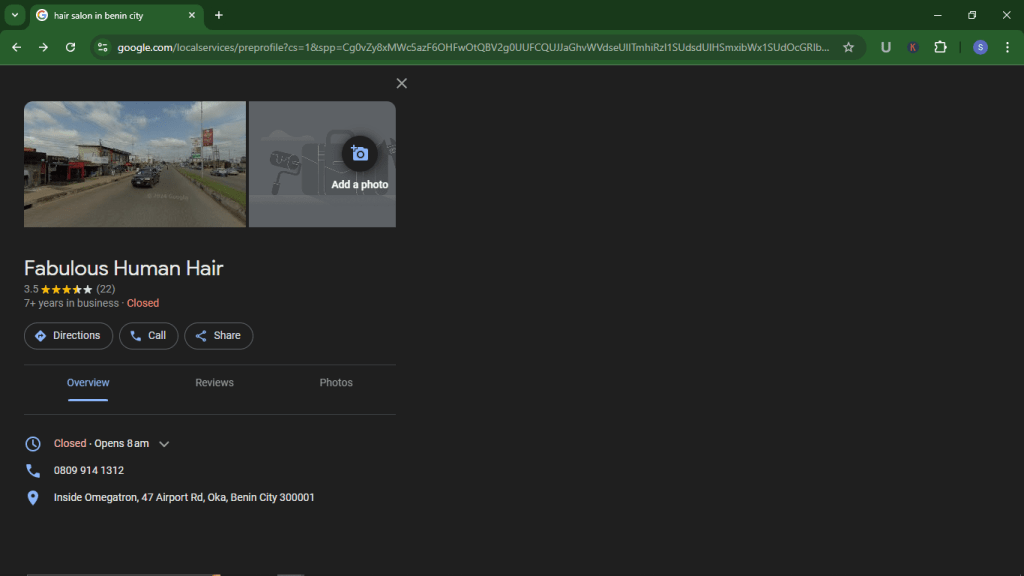
If your answer is A, you can skip to the next section because you already have an idea of the importance of optimising your profile. But if you answered B, keep reading; you need more context.
Here are three major reasons to improve your Google Business Profile :
1. Increase your local ranking
If a potential customer searches for “Spas near me,” Google will show results of spas that best fit the search. To determine that, Google’s algorithm considers the quality of information and activity of the profiles to show the best optimised one near the searcher.
2. Improve salon or spa engagement
It’s not enough to appear on SERPs, potential customers still need to engage with your business. Only an optimised profile provides potential customers with all the essential information they’d need to get in touch.
Up to 64% of customers online use Google Business Profiles to find contact information of local businesses. So, you can’t afford for yours to be wrong or missing.
Essential information to help your customers engage with your business includes:
- Phone number to call or text.
- Website or physical business location to visit.
- Prompt to leave positive reviews.
- Questions and answers (Q&A) section to help customers learn more about your salon or spa.
3. Get more customers
The ultimate goal for increased local ranking and business engagement is to convert most of the leads into first-time customers and then retain them as loyal customers.
How to optimise your Google Business Profile for success [8 tips]
Take a few minutes to implement the following tips on your Google Business Profile to increase your chances of landing new customers.
Here’s what your profile should look like:
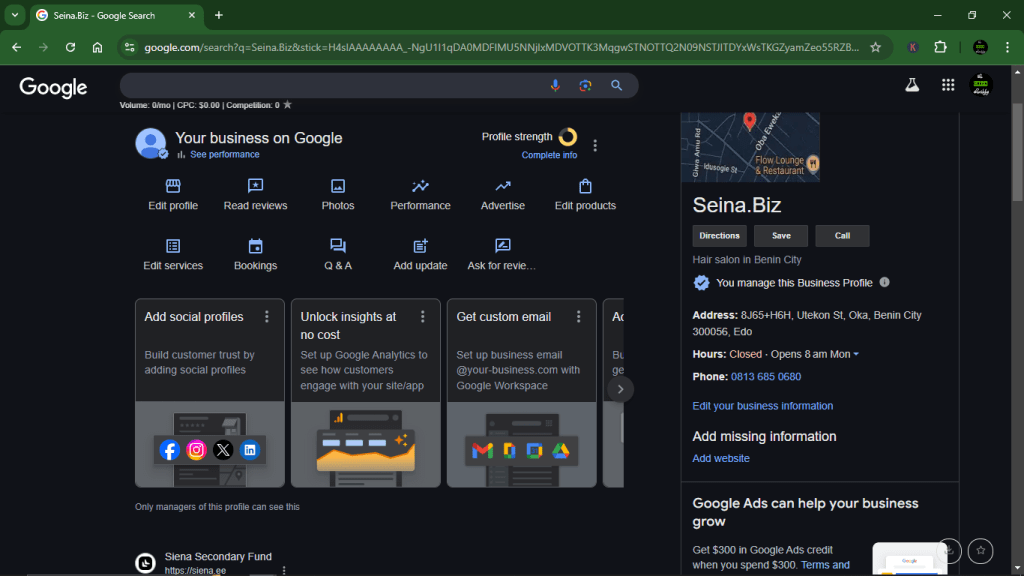
Tip 1: Fill out every section of your profile
You provided some essential information (e.g., business name and category) when you were setting up your profile. Some others, you probably skipped or weren’t prompted to fill in (e.g., amenities and special hour).
Now, sign in to your Google Business Profile.
Then, click “Edit profile.”
First, you want to go over all the details you initially provided to ensure they are accurate and modify them where necessary.
Next, proceed to fill out the other sections that are empty, from your social media profiles and to service options.
Completing your business profile will help it rank higher in local search results and increase the likelihood of potential customers finding your business.
Pick the correct beauty business category
Putting your business under the correct category is one of the most important actions because up to 84% of Google Business Profile views come from discovery searches, e.g., “Nail salon near me.” You don’t want this to be wrong.
If your beauty business belongs to more than one category, you can add more using the “Additional Category” section. But ensure that the most general one is your “Primary Category.”
For example, “Beauty Salon” can be your primary category, while “Nail Salon,” “Barbing Salon,” and “Hair Salon” can be additional categories.

Tip 2: List all your offerings
The range of your products and services may not be immediately obvious to your customers just from your business title or category. That’s why Google provides product and service sections to advertise what you do in detail and easily.
Utilise the sections to highlight your salon or spa’s specialised services and proprietary product lines, especially what sets you apart from your competitors.
Pro tip: When listing your products or services, add the names, brief descriptions, and prices.
Select “Edit products” and “Edit Service” to complete these sections.

Tip 3: Add a booking link
The whole point of listing your beauty business on Google Business Profile is to attract people you can turn into repeat customers. When potential customers eventually find your profile, ensure they can easily book your service right there.
You can use appointment booking software like Splice to generate a booking link to add to your Profile.
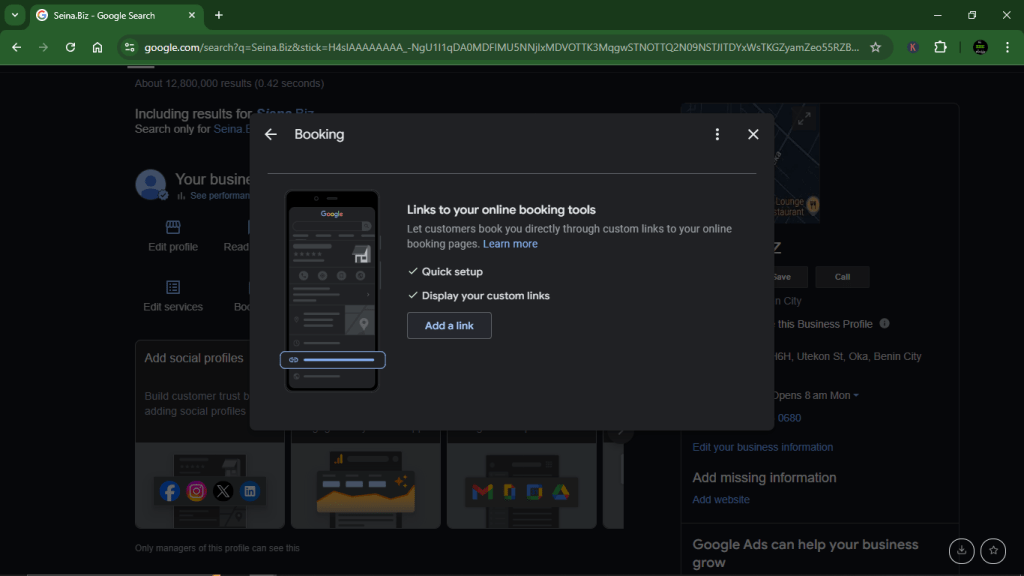
Click “Booking” and select “Add a link.”
Then, paste the booking page link you copied from Splice and click “Save.”
Tip 4: Set up profile messaging
As a salon or spa, enabling the messaging feature on your Google Business Profile lets customers send text messages directly to you on WhatsApp phone even if you don’t publish your phone number.
Since most smartphone users perform local searches on their phones, Google Business Profile messaging is a quick way to move things from discovery to engagement.

Tip 5: Upload descriptive photos
Compared to profiles without pictures, Google Business Profiles with images are twice as likely to be perceived as credible. Customers will choose to engage with profiles with pictures over ones without.
Upload high-quality images that accurately represent your beauty business, e.g., a picture of your logo, signboard, business interior and exterior, equipment and tools, your team, and your finished works.
Click “Photos” and select “Add a cover photo” to upload an image that generally represents your salon or spa and “Add a logo” to upload your business logo if you have one. Then, click “Add photos” to upload other images of your business.

Pro tip: Regularly post pictures to keep your profile active. Google algorithm ranks active profiles better.
Tip 6: Encourage customers to leave reviews
An effective way to optimise your Google Business Profile is to utilise the review feature. Some solid customer reviews might be the difference between a potential customer choosing your business over your competitors.
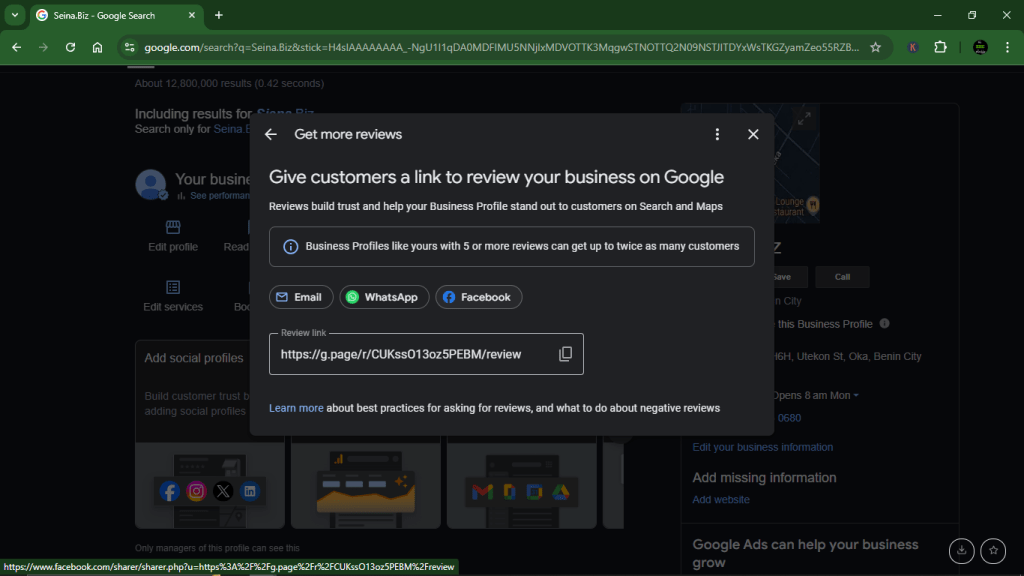
Start by sharing the review link with your long-standing, loyal customers, who are more likely to help out, and ask them to leave reviews. Most of them will leave a review if you ask.
Also, ensure you respond to ALL reviews because 88% of consumers would patronise a business that replies to all of its reviews.
Pro tip: You can make it easy for your customers to write reviews for your business by including the link in your appointment reminder text or email. Splice can help you achieve this.
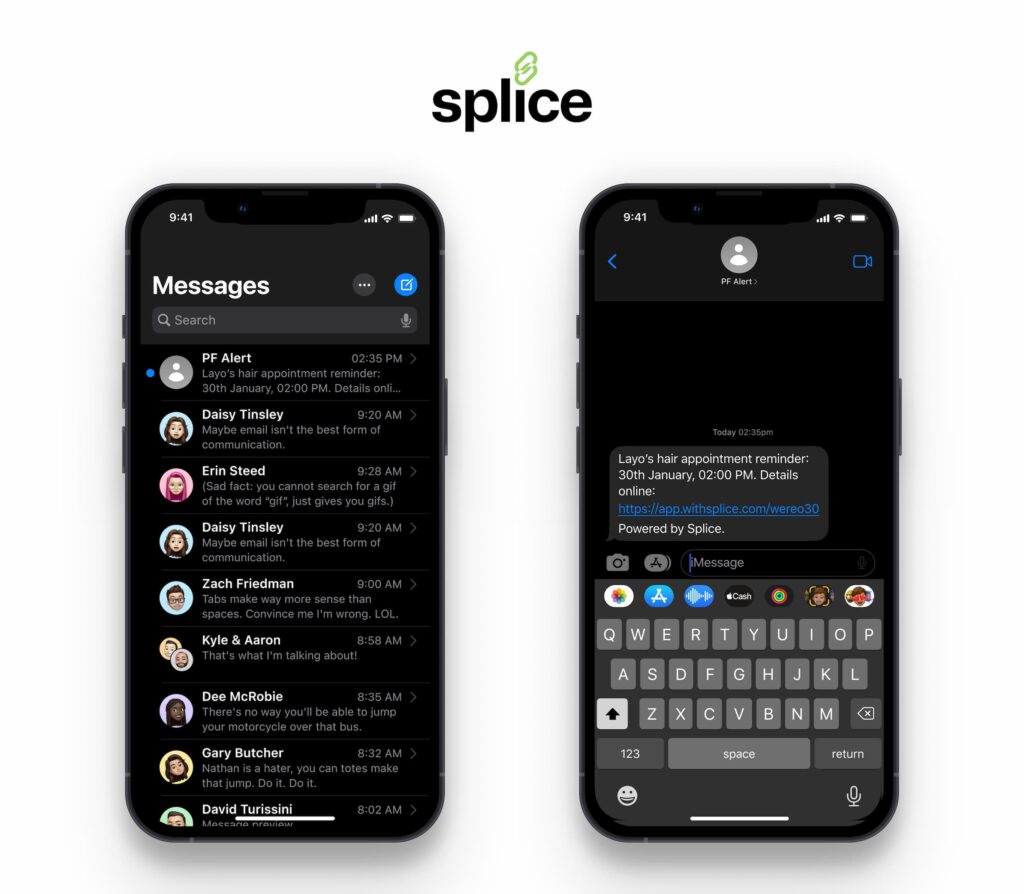
Tip 7: Create a list of questions & answers (Q&A)
The Questions & Answers section of your Google Business Profile is a crucial marketing tool for improving the quality of your leads.
To create one, click “Q&A” and select frequently asked questions by customers and answer them. This is also the opportunity to answer questions that have yet to be asked but you know customers will want to know.
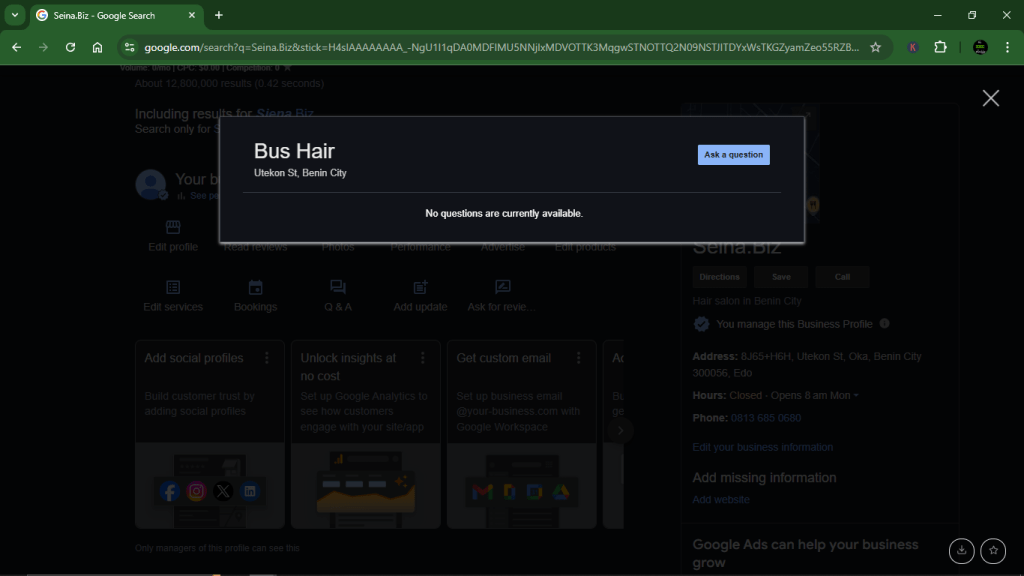
Common questions include “Do you accept walk-ins?” and “Is there a parking space?”
Assume the potential customer knows nothing about your business and create a list of questions and answers that might help clear their doubt and get them to book your service.
Pro tip: Set alerts to respond promptly to incoming questions and remove incorrect answers.
Tip 8: Update profile regularly
Optimising your Google Business Profile is an ongoing job. As we’ve established, active profiles rank higher in local search results on Google. So, you must take your Business Profile like another one of your social media platforms and update it regularly.
While you may not need to post quite as often as Instagram, you must respond to reviews and questions promptly and upload new photos regularly — once a week is ideal.
You can also click the “Add update” section to routinely announce business news, offers, and events.
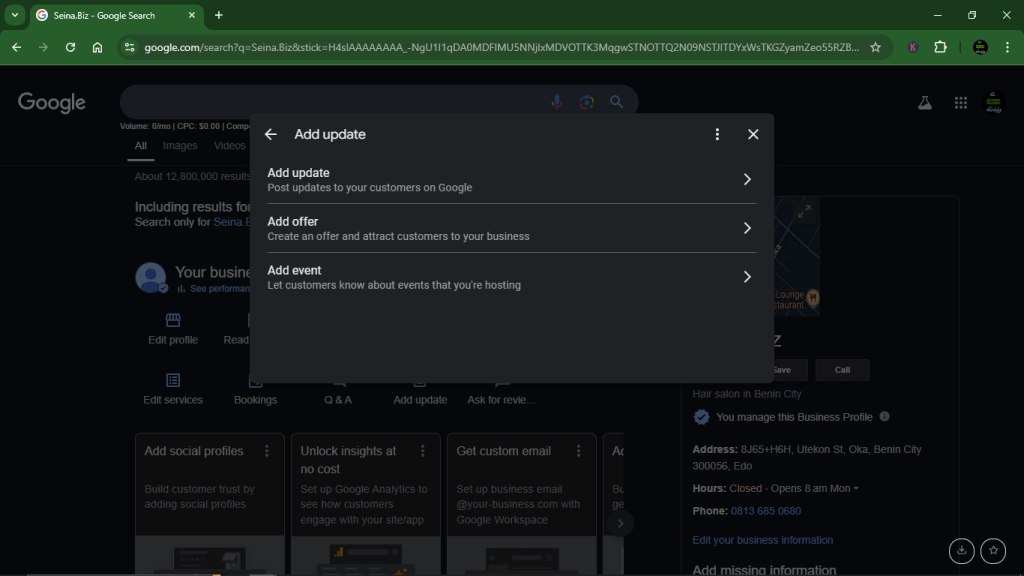
Pro tip: Attach links and a call to action (CTA) in your updates to enable customers to take immediate action.
Conclusion
Optimise your Google Business Profile and help your salon or spa take full advantage of the free tool. Complete your profile, ensure all the information is accurate, and keep an active profile to improve local search ranking.
Let Splice help you automate your business operations as you improve your Google Business Profile to attract more customers.


